

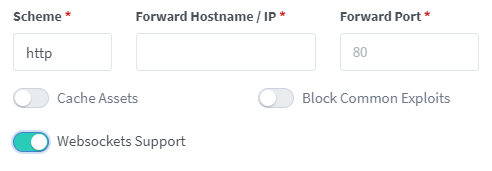
 Add this Custom Nginx Configuration (under "Edit Proxy Host" > settings cog):
```nginx
proxy_connect_timeout 86400s;
proxy_send_timeout 86400s;
proxy_read_timeout 86400s;
send_timeout 86400s;
proxy_set_header X-Forwarded-For $proxy_add_x_forwarded_for;
proxy_set_header X-Forwarded-Proto $scheme;
proxy_set_header X-Real-IP $remote_addr;
proxy_set_header Upgrade $http_upgrade;
proxy_set_header Connection "upgrade";
proxy_set_header Host $host;
```
### NGINX Reverse Proxy
Add this to the site config file on your nginx server after you have changed the relevant parts in the <> brackets, and inserted your certificate paths.
```bash
server {
listen 443 ssl;
server_name .
Add this Custom Nginx Configuration (under "Edit Proxy Host" > settings cog):
```nginx
proxy_connect_timeout 86400s;
proxy_send_timeout 86400s;
proxy_read_timeout 86400s;
send_timeout 86400s;
proxy_set_header X-Forwarded-For $proxy_add_x_forwarded_for;
proxy_set_header X-Forwarded-Proto $scheme;
proxy_set_header X-Real-IP $remote_addr;
proxy_set_header Upgrade $http_upgrade;
proxy_set_header Connection "upgrade";
proxy_set_header Host $host;
```
### NGINX Reverse Proxy
Add this to the site config file on your nginx server after you have changed the relevant parts in the <> brackets, and inserted your certificate paths.
```bash
server {
listen 443 ssl;
server_name . ### Dev Container Setup
The easiest way to begin developing this project is to use a dev container. An introduction to dev containers in VSCode can be found [here](https://code.visualstudio.com/docs/devcontainers/containers).
Required Software:
- [Docker Desktop](https://www.docker.com/products/docker-desktop/)
- [VSCode](https://code.visualstudio.com/download)
_Note, it is possible to use other container software than Docker and IDEs other than VSCode. However, this setup is more complicated and not covered here._
### Dev Container Setup
The easiest way to begin developing this project is to use a dev container. An introduction to dev containers in VSCode can be found [here](https://code.visualstudio.com/docs/devcontainers/containers).
Required Software:
- [Docker Desktop](https://www.docker.com/products/docker-desktop/)
- [VSCode](https://code.visualstudio.com/download)
_Note, it is possible to use other container software than Docker and IDEs other than VSCode. However, this setup is more complicated and not covered here._
Note: This requires a PowerShell prompt with winget installed. You should be able to copy and paste the code block to install. If you use an elevated PowerShell prompt, UAC will not pop up during the installs. ```PowerShell winget install -e --id Docker.DockerDesktop; ` winget install -e --id Microsoft.VisualStudioCode ```
```sh brew install --cask docker visual-studio-code ```
```sh sudo snap install docker; \ sudo snap install code --classic ```