

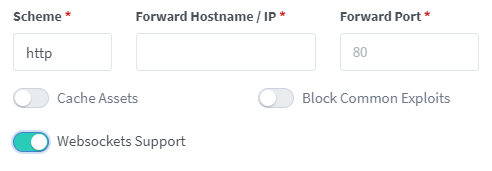
 For OIDC and RSS feeds to work if your external access URL contains a custom port (like https://xx.yy.zz:1234/audiobookshelf/), the Host header sent by NGINX Proxy Manager is incorrect, as it doesn't include the port number. This can be fixed by adding a custom location of "/" and then opening the advanced configuration field by clicking the cogwheel. Add this additional header line here:
proxy_set_header Host $http_host;

### NGINX Reverse Proxy
Add this to the site config file on your nginx server after you have changed the relevant parts in the <> brackets, and inserted your certificate paths.
```bash
server {
listen 443 ssl;
server_name .
For OIDC and RSS feeds to work if your external access URL contains a custom port (like https://xx.yy.zz:1234/audiobookshelf/), the Host header sent by NGINX Proxy Manager is incorrect, as it doesn't include the port number. This can be fixed by adding a custom location of "/" and then opening the advanced configuration field by clicking the cogwheel. Add this additional header line here:
proxy_set_header Host $http_host;

### NGINX Reverse Proxy
Add this to the site config file on your nginx server after you have changed the relevant parts in the <> brackets, and inserted your certificate paths.
```bash
server {
listen 443 ssl;
server_name . ### Dev Container Setup
The easiest way to begin developing this project is to use a dev container. An introduction to dev containers in VSCode can be found [here](https://code.visualstudio.com/docs/devcontainers/containers).
Required Software:
- [Docker Desktop](https://www.docker.com/products/docker-desktop/)
- [VSCode](https://code.visualstudio.com/download)
_Note, it is possible to use other container software than Docker and IDEs other than VSCode. However, this setup is more complicated and not covered here._
### Dev Container Setup
The easiest way to begin developing this project is to use a dev container. An introduction to dev containers in VSCode can be found [here](https://code.visualstudio.com/docs/devcontainers/containers).
Required Software:
- [Docker Desktop](https://www.docker.com/products/docker-desktop/)
- [VSCode](https://code.visualstudio.com/download)
_Note, it is possible to use other container software than Docker and IDEs other than VSCode. However, this setup is more complicated and not covered here._
Note: This requires a PowerShell prompt with winget installed. You should be able to copy and paste the code block to install. If you use an elevated PowerShell prompt, UAC will not pop up during the installs. ```PowerShell winget install -e --id Docker.DockerDesktop; ` winget install -e --id Microsoft.VisualStudioCode ```
```sh brew install --cask docker visual-studio-code ```
```sh sudo snap install docker; \ sudo snap install code --classic ```