|
|
||
|---|---|---|
| certs | ||
| doc | ||
| mod | ||
| README.d | ||
| .gitignore | ||
| accesslist-duplicates.capsman | ||
| accesslist-duplicates.local | ||
| accesslist-duplicates.template | ||
| backup-cloud | ||
| backup-email | ||
| backup-partition | ||
| backup-upload | ||
| capsman-download-packages | ||
| capsman-rolling-upgrade | ||
| certificate-renew-issued | ||
| check-certificates | ||
| check-health | ||
| check-lte-firmware-upgrade | ||
| check-routeros-update | ||
| collect-wireless-mac.capsman | ||
| collect-wireless-mac.local | ||
| collect-wireless-mac.template | ||
| CONTRIBUTIONS.md | ||
| COPYING.md | ||
| daily-psk.capsman | ||
| daily-psk.local | ||
| daily-psk.template | ||
| dhcp-lease-comment.capsman | ||
| dhcp-lease-comment.local | ||
| dhcp-lease-comment.template | ||
| dhcp-to-dns | ||
| firmware-upgrade-reboot | ||
| global-config | ||
| global-config-overlay | ||
| global-config.changes | ||
| global-functions | ||
| global-wait | ||
| gps-track | ||
| hotspot-to-wpa | ||
| hotspot-to-wpa-cleanup | ||
| INITIAL-COMMANDS.md | ||
| ip-addr-bridge | ||
| ipsec-to-dns | ||
| ipv6-update | ||
| learn-mac-based-vlan | ||
| lease-script | ||
| leds-day-mode | ||
| leds-night-mode | ||
| leds-toggle-mode | ||
| log-forward | ||
| logo.avif | ||
| logo.png | ||
| logo.svg | ||
| Makefile | ||
| manage-umts | ||
| mode-button | ||
| netwatch-dns | ||
| netwatch-notify | ||
| netwatch-syslog | ||
| ospf-to-leds | ||
| packages-update | ||
| ppp-on-up | ||
| README.md | ||
| rotate-ntp | ||
| sms-action | ||
| sms-forward | ||
| ssh-keys-import | ||
| super-mario-theme | ||
| unattended-lte-firmware-upgrade | ||
| update-gre-address | ||
| update-tunnelbroker | ||

RouterOS Scripts





RouterOS is the operating system developed by MikroTik for networking tasks. This repository holds a number of scripts to manage RouterOS devices or extend their functionality.
Use at your own risk, pay attention to license and warranty!
Requirements
Latest version of the scripts require recent RouterOS to function properly. Make sure to install latest updates before you begin.
Specific scripts may require even newer RouterOS version.
Initial setup
Get me ready!
If you know how things work just copy and paste the
initial commands. Remember to edit and rerun
global-config-overlay!
First time users should take the long way below.
Live presentation
Want to see it in action? I've had a presentation Repository based RouterOS script distribution including demonstation recorded live at MUM Europe 2019 in Vienna.
⚠️ Warning: Some details changed. So see the presentation, then follow the steps below for up-to-date commands.
The long way in detail
The update script does server certificate verification, so first step is to download the certificates. If you intend to download the scripts from a different location (for example from github.com) install the corresponding certificate chain.
/ tool fetch "https://git.eworm.de/cgit/routeros-scripts/plain/certs/R3.pem" dst-path="letsencrypt-R3.pem";

Note that the commands above do not verify server certificate, so if you want to be safe download with your workstations's browser and transfer the files to your MikroTik device.
- ISRG Root X1
- Let's Encrypt R3
Then we import the certificates.
/ certificate import file-name=letsencrypt-R3.pem passphrase="";

For basic verification we rename the certificates and print their count. Make sure the certificate count is two.
/ certificate set name="R3" [ find where fingerprint="67add1166b020ae61b8f5fc96813c04c2aa589960796865572a3c7e737613dfd" ];
/ certificate set name="ISRG-Root-X1" [ find where fingerprint="96bcec06264976f37460779acf28c5a7cfe8a3c0aae11a8ffcee05c0bddf08c6" ];
/ certificate print count-only where fingerprint="67add1166b020ae61b8f5fc96813c04c2aa589960796865572a3c7e737613dfd" or fingerprint="96bcec06264976f37460779acf28c5a7cfe8a3c0aae11a8ffcee05c0bddf08c6";

Always make sure there are no certificates installed you do not know or want!
All following commands will verify the server certificate. For validity the certificate's lifetime is checked with local time, so make sure the device's date and time is set correctly!
Now let's download the main scripts and add them in configuration on the fly.
:foreach Script in={ "global-config"; "global-config-overlay"; "global-functions" } do={ / system script add name=$Script source=([ / tool fetch check-certificate=yes-without-crl ("https://git.eworm.de/cgit/routeros-scripts/plain/" . $Script . "\?h=routeros-v6") output=user as-value]->"data"); };

The configuration needs to be tweaked for your needs. Edit
global-config-overlay, copy configuration from
global-config (the one without -overlay).
Save changes and exit with Ctrl-o.
/ system script edit global-config-overlay source;
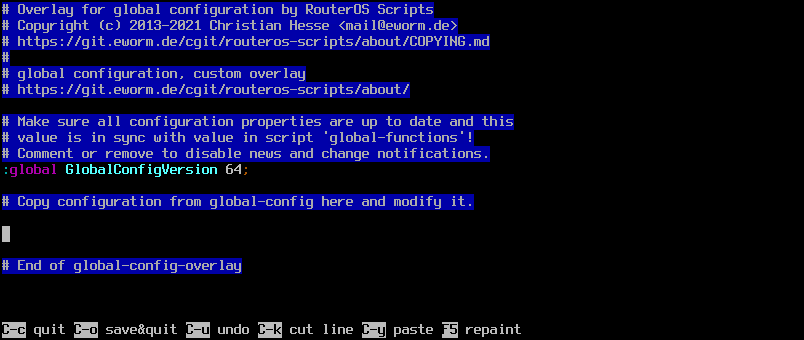
And finally load configuration and functions and add the scheduler.
/ system script { run global-config; run global-functions; };
/ system scheduler add name="global-scripts" start-time=startup on-event="/ system script { run global-config; run global-functions; }";

The last step is optional: Add this scheduler only if you want the scripts to be updated automatically!
/ system scheduler add name="ScriptInstallUpdate" start-time=startup interval=1d on-event=":global ScriptInstallUpdate; \$ScriptInstallUpdate;";

Changes for RouterOS v6
Let's consider RouterOS v6 being legacy. If you want to stay with RouterOS
v6 for some time add these lines to your global-config-overlay, if missing:
# Use branch routeros-v6 with RouterOS v6:
:global ScriptUpdatesUrlSuffix "\?h=routeros-v6";
Then reload the configuration.
Changes for RouterOS v7
RouterOS v7 is the future, and default branch main expects it. Just drop
$ScriptUpdatesUrlSuffix from your global-config-overlay to use that.
Then reload the configuration and continue below to update scripts.
Updating scripts
To update existing scripts just run function $ScriptInstallUpdate. If
everything is up-to-date it will not produce any output.
$ScriptInstallUpdate;

Adding a script
To add a script from the repository run function $ScriptInstallUpdate with
a comma separated list of script names.
$ScriptInstallUpdate check-certificates,check-routeros-update;

Scheduler and events
Most scripts are designed to run regularly from
scheduler. We just
added check-routeros-update, so let's run it every hour to make sure not to
miss an update.
/ system scheduler add name="check-routeros-update" interval=1h on-event="/ system script run check-routeros-update;";

Some events can run a script. If you want your DHCP hostnames to be available
in DNS use dhcp-to-dns with the events from dhcp server. For a regular
cleanup add a scheduler entry.
$ScriptInstallUpdate dhcp-to-dns,lease-script;
/ ip dhcp-server set lease-script=lease-script [ find ];
/ system scheduler add name="dhcp-to-dns" interval=5m on-event="/ system script run dhcp-to-dns;";

There's much more to explore... Have fun!
Available scripts
- Find and remove access list duplicates
- Upload backup to Mikrotik cloud
- Send backup via e-mail
- Save configuration to fallback partition
- Upload backup to server
- Download packages for CAP upgrade from CAPsMAN
- Run rolling CAP upgrades from CAPsMAN
- Renew locally issued certificates
- Renew certificates and notify on expiration
- Notify about health state
- Notify on LTE firmware upgrade
- Notify on RouterOS update
- Collect MAC addresses in wireless access list
- Use wireless network with daily psk
- Comment DHCP leases with info from access list
- Create DNS records for DHCP leases
- Automatically upgrade firmware and reboot
- Wait for global functions und modules
- Send GPS position to server
- Use WPA2 network with hotspot credentials
- Create DNS records for IPSec peers
- Update configuration on IPv6 prefix change
- Manage IP addresses with bridge status
- Run other scripts on DHCP lease
- Manage LEDs dark mode
- Forward log messages via notification
- Mode button with multiple presses
- Manage DNS and DoH servers from netwatch
- Notify on host up and down
- Manage remote logging
- Visualize OSPF state via LEDs
- Manage system update
- Run scripts on ppp connection
- Rotate NTP servers
- Act on received SMS
- Forward received SMS
- Import SSH keys
- Play Super Mario theme
- Install LTE firmware upgrade
- Update GRE configuration with dynamic addresses
- Update tunnelbroker configuration
Available modules
- Manage ports in bridge
- Manage VLANs on bridge ports
- Inspect variables
- IP address calculation
- Send notifications via Matrix
- Send notifications via Telegram
- Download script and run it once
Installing custom scripts & modules
My scripts cover a lot of use cases, but you may have your own ones. You can
still use my scripts to manage and deploy yours, by specifying base-url
(and url-suffix) for each script.
This will fetch and install a script hello-world.rsc from the given url:
$ScriptInstallUpdate hello-world.rsc "base-url=https://git.eworm.de/cgit/routeros-scripts/plain/README.d/"

(Yes, the example url still belongs to the repository for easy handling - but the url can be what ever you use.)
For a script to be considered valid it has to begin with a magic token. Have a look at any script and copy the first line without modification.
Starting a script's name with mod/ makes it a module and it is run
automatically by global-functions.
Contact
We have a Telegram Group RouterOS-Scripts!

Get help, give feedback or just chat - but do not expect free professional support!
Contribute
Thanks a lot for past contributions!
Patches, issues and whishlist
Feel free to contact me via e-mail or open an issue at github.
Donate
This project is developed in private spare time and usage is free of charge for you. If you like the scripts and think this is of value for you or your business please consider to donate with PayPal.

Thanks a lot for your support!
License and warranty
This program is free software: you can redistribute it and/or modify it under the terms of the GNU General Public License as published by the Free Software Foundation, either version 3 of the License, or (at your option) any later version.
This program is distributed in the hope that it will be useful, but WITHOUT ANY WARRANTY; without even the implied warranty of MERCHANTABILITY or FITNESS FOR A PARTICULAR PURPOSE. See the GNU General Public License for more details.
Upstream
URL: GitHub.com
Mirror: eworm.de GitLab.com